What's new in Learning Pathways version 3

Microsoft Learning Pathways just launched with version 3.0. In this blog I'll provide an overview of what has updated with this new version of Learning Pathways. If you don't know what Learning Pathways is check out my blog or Microsoft documentation. If you already have Learning Pathways you can manually deploy the app package to your app catalog to update the application.

New Content

New content has been added for the following apps: 
  • Teams
  • Outlook
  • OneDrive
  • Planner
  • Sway
  • OneDrive
In addition to these updates for existing applications two additional areas now have content: 
  • Accessibility 

  • Access

New Features

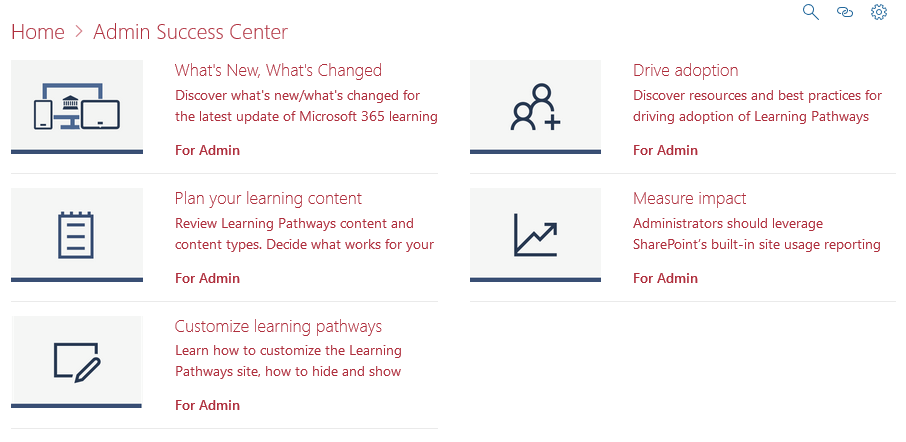
Microsoft Success Center

The Microsoft Success Center provides you with all the information you need to know what's going on inside of Learning Pathways such as how to customize Learning Pathways, to helping you plan you training content, and even provides and overview of What's New, and What's changed. 


Playlist Navigation

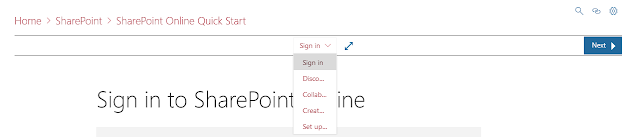
It is now easier than ever to navigate between the different assets inside of a playlist. With the new central nav you can see a drop down of all of the content inside of a playlist.

Full Screen Mode

Right next to the new centralized playlist navigation is the new option for full screen mode. so you can view more content without any navigation or headers. 


Copy a Playlist

Finally there is the new copy a playlist feature. There is a good chance that you've wanted to or needed to slightly modify and existing playlist because you haven't rolled out one particular feature. With the new copy feature you can now copy an existing playlist and modify it to your heart's content, no more having to create a brand new playlist from scratch just to hide or modify one playlist asset. The best part about this is if you copy a default playlist and make changes to it, the assets that are from Microsoft will continue to get updates if content changes for that asset. 


Comments

  1. Casino Secrets | Casino of IB
    Casino Secrets. It is a casino with bet365 online slots, and a ミスティーノ very strong カジノ シークレット list of games at casinos.com, which includes many online slot games

    ReplyDelete

Post a Comment

Popular posts from this blog

SharePoint Site Theming: Header Background Colors

As Microsoft rolls out the new Mega Menu experience for the Modern UI some of you may be wondering where these colors come from. In this post I will review the header background color options and call out which theme colors get used along the way. From left to right in the image below we have the four background options, which I'll call by the names of their color labels, Background Color (White) Theme, Neutral Light Theme, Light Theme, Dark Theme. I used the Microsoft Theme generator ( https://developer.microsoft.com/en-us/fabric#/styles/themegenerator ) to create my theme and applied the theme to my tenant using the Add-PnPTenantTheme ( https://docs.microsoft.com/en-us/powershell/module/sharepoint-pnp/add-pnptenanttheme?view=sharepoint-ps ) command to apply the following theme in PowerShell, I've also added comments to lines that impact themes for your reference. @{ "themePrimary" = "#0a162b"; #Theme Dark Local "themeLighterAlt" = "...

Quick Look at the Surface Duo Android Emulator

Microsoft recently released their SDK and Emulator for developing dual screen applications for the Surface Duo ( https://docs.microsoft.com/en-us/dual-screen/introduction ) and being a bit curious about what the experience was going to be on a dual screen device I decided to give download it and give it a try.  First Impressions First and foremost there is the novelty of having two apps launched side by side. The Duo emulator is using Android Version 10 and to be API version 29, both are the latest versions of Android. There is no Play Store or Microsoft Store on the emulator, which is to be expected as its main purpose is app development. But beyond that it appears that most of the Google applications are not included in the device and the build is based off the Android Open Source Project (AOSP) more than anything else. What typically are the default applications on Android have been replaced with Microsoft Applications.  Launcher is the Microsoft L...

The Behind the Scenes Scope of SharePoint News

I recently had someone ask if there was any way to disable the ability to send a SharePoint news article to an external party and after some clarification it became apparently that even with external sharing completely disabled in the tenant you can, in fact, send a preview of the article to any email address. After some research it became apparent that there is no ability to turn off this functionality which caused some concern of potential data leakage. For reference we are talking about the SharePoint news article 'Send to' functionality shown below.  While a credential is needed to access the full article, any email sent will include an article preview. The article preview doesn't show anything too worrisome as it is just the title, the first few lines of text, and an image but one area that caught my eye was the ability to add in the optional message. After some testing it does not appear that there is any length limit to the text that can be put in the summary, it got...